
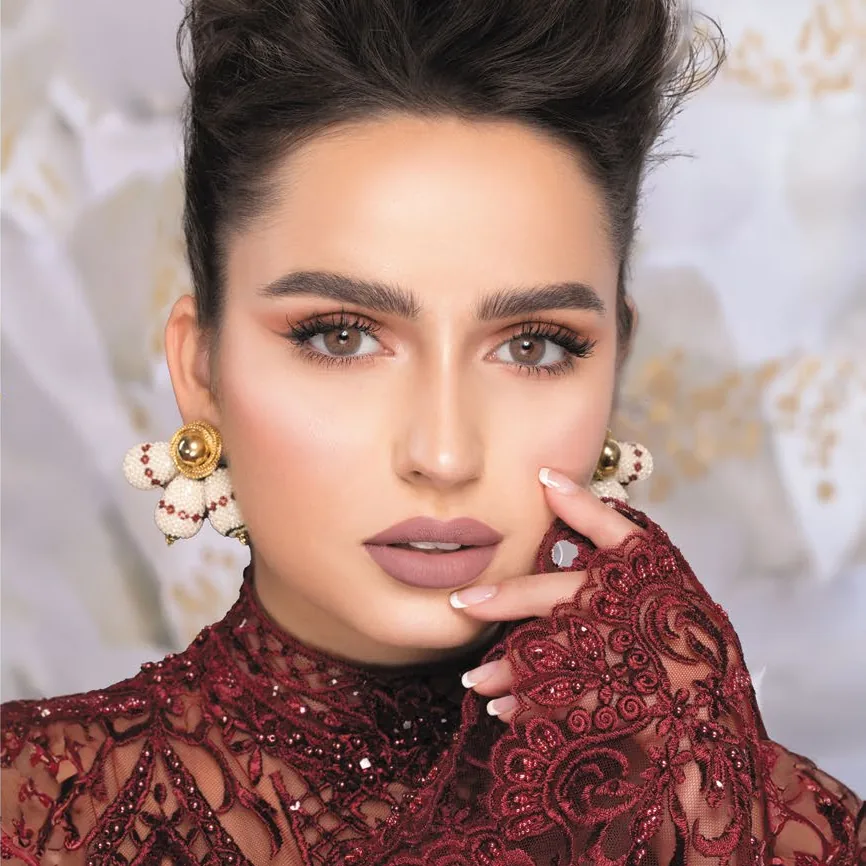







Naturèl La Amber
$25
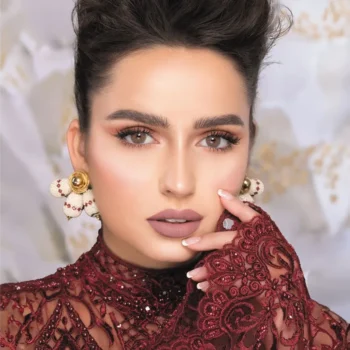
Soft honey brown with misty gray tones, framed by a gentle outline for brighter, more defined eyes.
- 38% water content
- Powers: plano 0.00 and −0.50 to −8.00
- 2 lenses (one pair) per box
- Polymacon, made in Korea
- US orders need a valid contact lens prescription (plano included)
- Description
- Informations complémentaires
- Avis (0)
- How to use
- Convert from glasses Rx
- Shipping & Delivery
Honey with a little mist. Naturèl La Amber blends a soft honey brown with misty gray tones and finishes with a gentle defined outline. From the La (Limit) collection, it adds definition and keeps the color natural, so it works for daily wear and evenings out.
- Gentle outline that makes your eyes look brighter
- Plano or prescription from −0.50 to −8.00
- Soft polymacon lenses with 38% water content
- Sterile blister packaging
- Made in Korea under ISO 13485, CE marked, FDA-cleared under 510(k) K141699, made by Vassen Co., Ltd. in Korea, and approved by the health authorities in the countries we ship to
How to style it: beige or champagne shadow with thin black liner and light mascara.
| Poids | 0.05 kg |
|---|---|
| Color |
Hazel |
| Duration of Usage | |
| Diameter |
14.3 mm |
| Base Curve |
8.6 mm |
| Water Content |
38% |
| Material |
Polymacon |
| Made In |
Korea |
| In the Box |
2 lenses (one pair) |
| Power Range |
Plano, −0.50 to −8.00 |
Naturèl La Amber
Putting your lenses in
- Wash and dry your hands well.
- Take one lens out and rinse it with fresh multipurpose solution. Never use tap water.
- Place the lens on the tip of your index finger. It should look like a bowl with straight edges. If the edges flare out, it is inside out.
- Hold your upper lid with your other hand and pull your lower lid down with your middle finger.
- Look up or straight ahead and gently place the lens on your eye.
- Release your lids slowly and blink a few times so the lens settles.
- Repeat for the other eye. Start with the same eye every time so you don't mix them up.
Taking your lenses out
- Wash and dry your hands.
- Look up, pull your lower lid down and slide the lens down onto the white of your eye.
- Gently pinch the lens with your thumb and index finger and remove it.
- Clean it, then store it in the case in fresh solution. Throw away the old solution every time.
Good habits
- Put your lenses in before makeup, and take them out before removing makeup.
- Don't sleep, shower or swim in your lenses.
- Replace the pair on schedule after opening, and replace the lens case regularly.
- Take them out and see your eye doctor if you notice redness, pain or blurry vision.
More tips are in our lens care guide.
Glasses sit a little in front of your eye and contact lenses sit on it, so from −4.00 and stronger the contact lens power is lower than your glasses power. Use this chart as a guide only. US orders still need a valid contact lens prescription, plano included, and we verify it before shipping.
Glasses power (SPH) to contact lens power
| Glasses (SPH) | Contact lenses |
|---|---|
| −0.50 to −3.75 | Same as your glasses |
| −4.00 | −3.75 |
| −4.25 | −4.00 |
| −4.50 | −4.25 |
| −4.75 | −4.50 |
| −5.00 | −4.75 |
| −5.25 | −5.00 |
| −5.50 | −5.00 |
| −5.75 | −5.50 |
| −6.00 | −5.50 |
| −6.25 | −6.00 |
| −6.50 | −6.00 |
| −6.75 | −6.00 |
| −7.00 | −6.50 |
| −7.25 | −6.50 |
| −7.50 | −7.00 |
| −7.75 | −7.00 |
| −8.00 | −7.50 |
| −8.25 | −7.50 |
| −8.50 | −7.50 |
| −8.75 | −8.00 |
| −9.00 | −8.00 |
| Stronger than −9.00 | Not available |
- The chart follows our full power range: 0.25 steps to −5.00, then 0.50 steps to −8.00. Some brands stop at −5.00, so check the power list on each product.
- If your glasses prescription has a CYL (astigmatism) value, these colored lenses won't correct it. Ask your eye care professional.
- Plus (+) powers for farsightedness are not available.
En stock
Vous aimerez peut-être aussi…

Luminous Almond
$30
Luminous Cappuccino
$30
Luminous Hazel
$30


Produits similaires
 USD
 AED
 KWD
 OMR
Avis
Il n’y a encore aucun avis